
AI dinner apps
Samsung Food Does Almost Everything. RecipePT Focuses on Tonight.

Quick answer: Choose Samsung Food if you want a free recipe box, weekly planner, shopping list, ingredient search, communities, and access across iPhone, Android, and the web. Choose RecipePT if the job is narrower: give me three dinner ideas for tonight, use what you know about me, and let me change the short list with one sentence.
Samsung Food is not a weak dinner app. It is an unusually broad one. That matters because searching for a Samsung Food alternative can mean two opposite things: you want the same kitchen system from another company, or you want fewer tools between opening an app and choosing tonight's meal. This comparison is for the second problem.
I build RecipePT, so the comparison comes from one of the products in it. This is a product-positioning comparison, not a claim that I ran a hands-on test of every Samsung Food feature. Samsung facts come from the current Samsung Food product page, meal-planner page, Food+ page, and U.S. App Store listing, checked September 24, 2026.
What is the best Samsung Food alternative?
RecipePT is the better Samsung Food alternative when the unfinished job is choosing one dinner, not managing a food system. Samsung Food remains the better choice for saving recipes, building a week, sharing shopping lists, searching a large catalog, and working across devices. The right replacement depends on what you want removed.
- Choose Samsung Food when your recipes, plan, shopping, and cooking should live together.
- Choose RecipePT when you want tonight reduced to three personalized possibilities.
- Keep both if one should organize the week and the other should break a nightly tie.
Many alternative roundups compare feature counts. That makes breadth look automatically better, even when breadth is what created the search for an alternative. A recipe library must help you browse and organize. A weekly planner must create a schedule. A dinner decider should stop presenting possibilities once it has enough information to make a useful call.
What is the real difference between Samsung Food and RecipePT?
The difference is the size of the finished product. Samsung Food helps produce and maintain a food system: recipes, weekly plans, groceries, nutrition, communities, and cooking guidance. RecipePT helps produce a decision: three ideas for the current dinner, shaped by food rules and history, with a plain-language way to revise them.
Think in nouns. The object Samsung Food leaves you with is a library, plan, or list. The object RecipePT leaves you with is a selected direction for dinner and, once you open an idea, a recipe you can cook. Neither object is inherently better. Trouble starts when you ask a library to behave like a verdict or ask a verdict to replace a household's planning infrastructure.
This is also why Samsung Food's breadth should be conceded, not treated as a flaw. Its recipe import, community discovery, meal planner, smart shopping lists, nutrition data, and compatible appliance connections are useful jobs. RecipePT does not offer Android or web apps and is not trying to become the place where an entire household manages every food task.
When is Samsung Food clearly the better app?
Choose Samsung Food when you collect recipes from websites, plan several days at once, share groceries, want nutrition information, use Android or the web, or value compatible appliance connections. Its free tier covers much of the organizing work. RecipePT does not match that breadth and should not be chosen as a substitute for it.
Samsung Food's strongest case is continuity. A recipe can move from discovery or import into a weekly plan, then into a shopping list, then into a cooking flow. That is a coherent pipeline for someone who wants to plan. The public site also says recipes can be saved from any website, which makes it a natural answer to the problem of scattered browser tabs and bookmarks.
Its platform reach is another decisive advantage. Samsung Food supports iPhone, iPad, Android, and web, with optional access through parts of Samsung's appliance ecosystem. RecipePT is currently iPhone-only. If a partner needs Android or the household wants to plan on a laptop, that practical constraint settles the comparison before personalization does.
Can Samsung Food actually decide dinner for you?
Yes. Samsung Food+ offers AI-personalized weekly meal plans based on preferences and health goals, so it would be wrong to say Samsung Food cannot choose meals. The sharper distinction is that its deciding feature creates a plan inside a larger system. RecipePT begins with the immediate dinner and stops at three ideas.
Scope changes the interaction. Planning a week asks whether meals balance across days, support nutrition targets, and turn into a useful grocery trip. Choosing tonight asks what sounds right now, what is already available, how much effort is tolerable, and which familiar preferences should break the tie. The first problem benefits from structure. The second benefits from a deliberately small answer.
If a generated week is exactly what you want, Samsung Food+ is a real answer. If you already have a plan but do not feel like Tuesday's meal, or never plan a full week in the first place, a tonight-first tool is the more direct shape. Our guide to AI generators versus dinner deciders explains that boundary in more detail.
When is RecipePT the better alternative?
Choose RecipePT when opening a large recipe collection restarts the decision you wanted the app to end. It begins with three dinner ideas, uses saved, rated, rejected, and cooked history plus declared food rules, and lets you type a change for the current set. Its advantage is compression, not a larger catalog.
That distinction is close to our comparison of apps that cook with what you have. Matching ingredients can retrieve hundreds of technically possible recipes. A decision still needs a reason to prefer three of them tonight. RecipePT uses household context and dinner history for that final narrowing, then keeps the reader out of an endless results grid.
The limit should be explicit. RecipePT is paid, iPhone-only, and much less useful if your main goal is building a free cross-platform recipe archive. Its best fit is someone whose existing recipe sources are not the problem. They already have plenty of ideas. They want an opinionated first cut that they can correct without rebuilding a filter form.
What does a narrower dinner app feel like in practice?
The current RecipePT result screen says “3 meal ideas,” then shows one named option with time and leftover context. The example below is Garlic Butter Steak & Crispy Potatoes, tagged “Fresh twist,” “35 min,” and “Makes 2 meals.” A persistent box says “Tell RecipePT what to change” instead of sending you back to search.
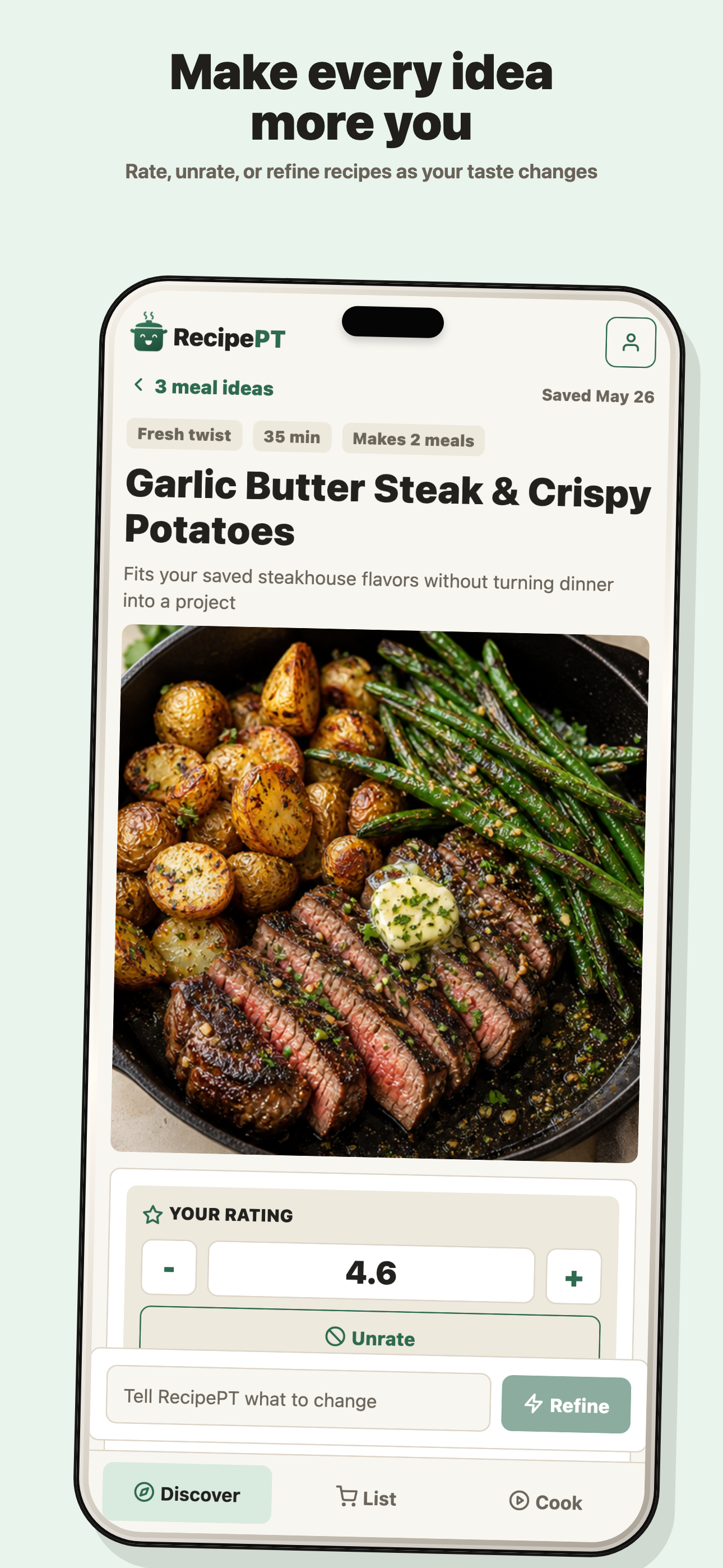
That screen is the first-hand proof behind the comparison. The point is not that steak and potatoes is universally the right answer. The point is that the result already carries a concrete reason to consider it, and the next action is a sentence such as “less cleanup” or “use the chicken first.” Refining changes the active choice instead of reopening a catalog.
Samsung Food's interface has to expose more destinations because it genuinely does more jobs. That is sensible product design for its mission. RecipePT can afford to be more opinionated because recipe importing, community browsing, shared shopping, nutrition tracking, and appliance control are not competing for equal status in the same experience.
Which app costs less?
Samsung Food costs less for recipe saving, manual meal planning, shopping lists, and broad discovery because those core tools are free. Both products charge for their more automated value. Samsung Food+ adds AI planning and other premium tools. RecipePT is a paid subscription after an eligible one-week trial, with U.S. plans currently below Samsung Food+'s annual price.
As of September 24, 2026, Samsung's U.S. Food+ page lists $6.99 monthly or $59.99 yearly. RecipePT's U.S. pricing is $6.99 monthly or $49.99 yearly, with the App Store showing the local price before confirmation. Prices and trial eligibility can change, so compare the current store screen rather than treating this paragraph as a permanent rate card.
The more important price question is what you would otherwise keep doing. Paying for RecipePT makes little sense if browsing saved recipes feels pleasant. Paying for Samsung Food+ makes little sense if you do not want an automated week, pantry assistance, or nutrition workflow. Free wins when the remaining work is work you do not mind.
Which app should you choose?
Choose Samsung Food for the whole kitchen workflow and RecipePT for the dinner bottleneck. Samsung Food is the stronger organizer, planner, shopping companion, and cross-platform service. RecipePT is the stronger fit when too many valid recipes are the problem and you want three personalized directions, one correction box, and a decision for tonight.
| Decision | Samsung Food | RecipePT |
|---|---|---|
| Primary job | Organize recipes, plans, shopping, and cooking | Narrow tonight to three dinner ideas |
| Best starting point | You want a library or weekly system | You want an immediate answer |
| Recipe import | Yes, from websites and supported sharing flows | Imports social posts, photos, and links into saved recipes |
| Planning | Manual weekly planning free; AI-personalized plans in Food+ | Tonight-first ideas and saved meal plans |
| Platforms | iPhone, iPad, Android, web, selected Samsung devices | iPhone |
| Honest limit | Breadth can leave a nightly choice to the user | Does not replace a broad, free household food system |
A fair verdict leaves room for the broad app to win. Samsung Food is the obvious pick when organizing food across a household is the goal. RecipePT is the alternative when organization is already handled and the unsolved part is the last five feet: turning preferences, constraints, and tonight's mood into one meal you are willing to make.
Want tonight narrowed before you start browsing?
RecipePT gives you three dinner ideas shaped by food rules and prior choices, then lets you type what should change. It is built for the decision Samsung Food's broader system may still leave open. On iPhone. Eligible new subscribers get a 1-week free trial. Cancel anytime.
Get RecipePT on iPhoneWhat else should you know?
Is Samsung Food free?
Samsung Food has a substantial free tier for saving recipes, building meal plans, making shopping lists, searching recipes, and joining communities. Samsung Food+ is the paid tier for features such as AI-personalized weekly plans, automated pantry management, nutrition tracking, and AI recipe customization. Features and local prices can change.
Can Samsung Food choose meals for me?
Yes. Samsung Food+ can create a personalized weekly meal plan from health goals and preferences. The distinction in this comparison is scope, not capability: Samsung Food produces and manages a plan, while RecipePT starts with three ideas for the immediate dinner and lets you refine that short list in plain language.
Does Samsung Food work without Samsung appliances?
Yes. Samsung says you do not need connected appliances to use its food service. Samsung Food is available on iPhone, iPad, Android, and the web. Compatible Samsung appliances add connected cooking and fridge access, but recipe saving, planning, shopping lists, and discovery do not depend on owning them.
What is the simplest Samsung Food alternative for deciding dinner?
RecipePT is the simpler alternative when you want a few personalized dinner ideas rather than a recipe library or weekly planning system. It is iPhone-only and paid after an eligible one-week trial. Samsung Food is the stronger choice for free recipe organization, broad planning, shared shopping, Android, or web access.