
Using RecipePT · Beta example
How to save a recipe from a screenshot on iPhone
A recipe screenshot is easier to cook from when you can find the complete ingredients and directions when you need them. Start with one that has the ingredient amounts and directions. Import the image into a recipe app, compare the result with the screenshot, then leave the recipe and find it again by name. Keep the original until you have checked the saved version.
This guide covers that workflow in RecipePT, plus an iPhone text-copying fallback for recipes split across screenshots. Check import access, available plans and trial terms in the app. We make RecipePT; the example below was tested in RecipePT 1.6.0 (207) beta on an iPhone simulator on October 30, 2026, not the current released iPhone app.
Start with the written recipe, not just the food photo
Open your screenshot and check that you can read:
- The recipe name and serving count, if provided.
- Every ingredient, including quantities and units.
- The complete method, including any temperature, resting or finishing instructions.
If a screenshot cuts off halfway through the method, return to the original post or recipe page for the missing part. A photo of a bowl of pasta cannot tell you exactly how much oil the creator used. Keep it as inspiration if you like, but do not treat a newly generated recipe as an exact copy of theirs.
For a photographed page, check the corners, the fold and any glare before importing. Crop away unrelated personal information in a separate copy, while keeping all the recipe text. Keep the original image and the creator's URL or book/page reference together somewhere you can return to.
Import one screenshot into RecipePT
The released App Store version history documents photo importing. These specific controls were observed in the beta test, so your released app may look different:
- Open Recipes, then Import.
- In the import dialog, choose Upload photo and select the screenshot containing your recipe.
- Let the import finish, then compare the saved ingredients and directions with the image.
- Return to Recipes, search for the recipe's name, and open the saved result.
That last step matters. A successful import should leave you with a recipe you can retrieve, not just a result you saw once. If it does not appear immediately, check your library and search before submitting the same image again.
For a recipe you still have as an Instagram link rather than an image, use our Instagram saving guide.
What our screenshot test preserved, and what it added
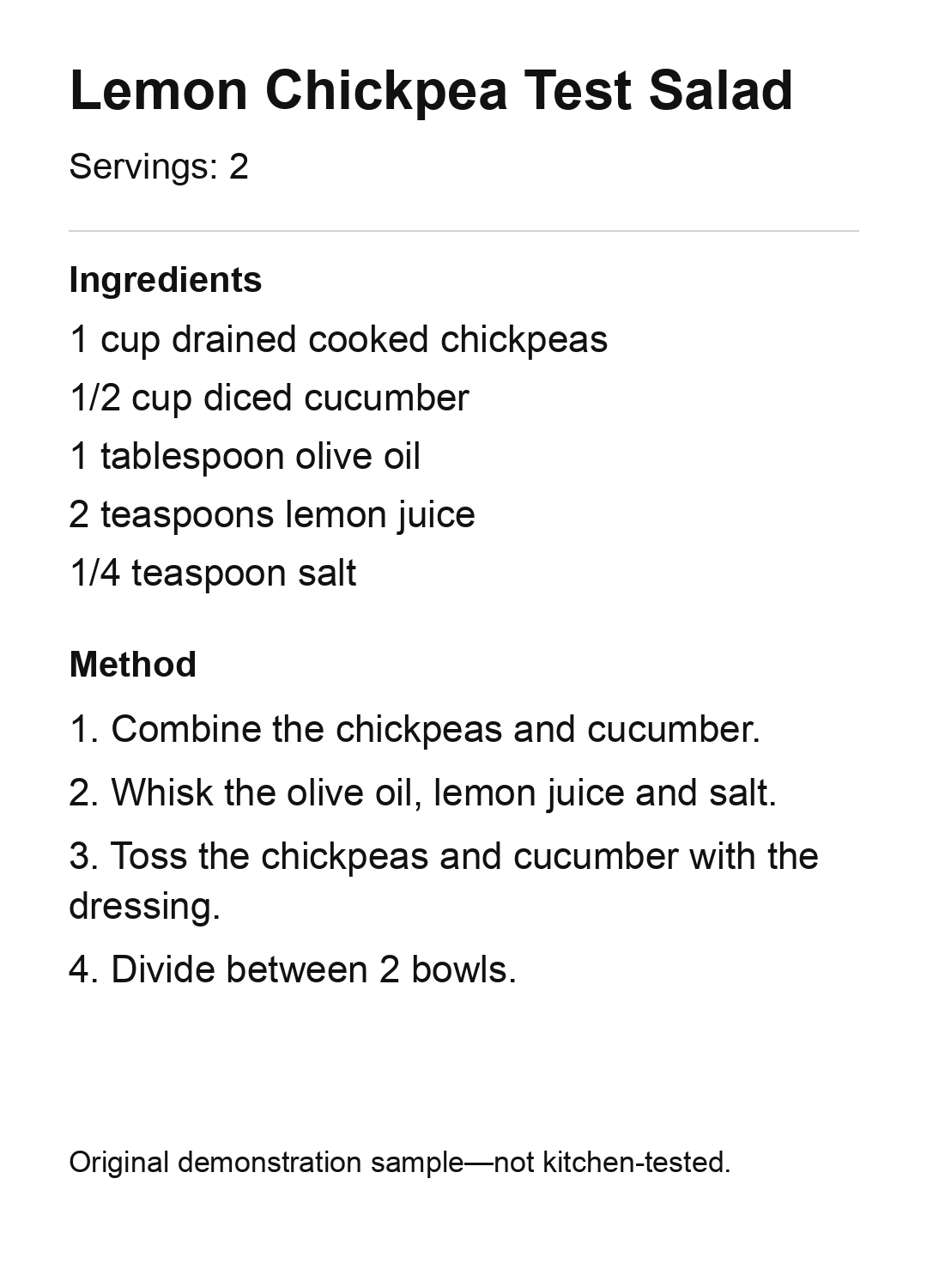
We used our own clearly printed demonstration recipe, Lemon Chickpea Test Salad, with two servings and four short instructions. It was a test sample, not a kitchen-tested recommendation.
| Written in our screenshot | Saved ingredient amount |
|---|---|
| 1 cup drained cooked chickpeas | 1 cup |
| 1/2 cup diced cucumber | 0.5 cup |
| 1 tablespoon olive oil | 1 tbsp |
| 2 teaspoons lemon juice | 2 tsp |
| 1/4 teaspoon salt | 0.25 tsp |
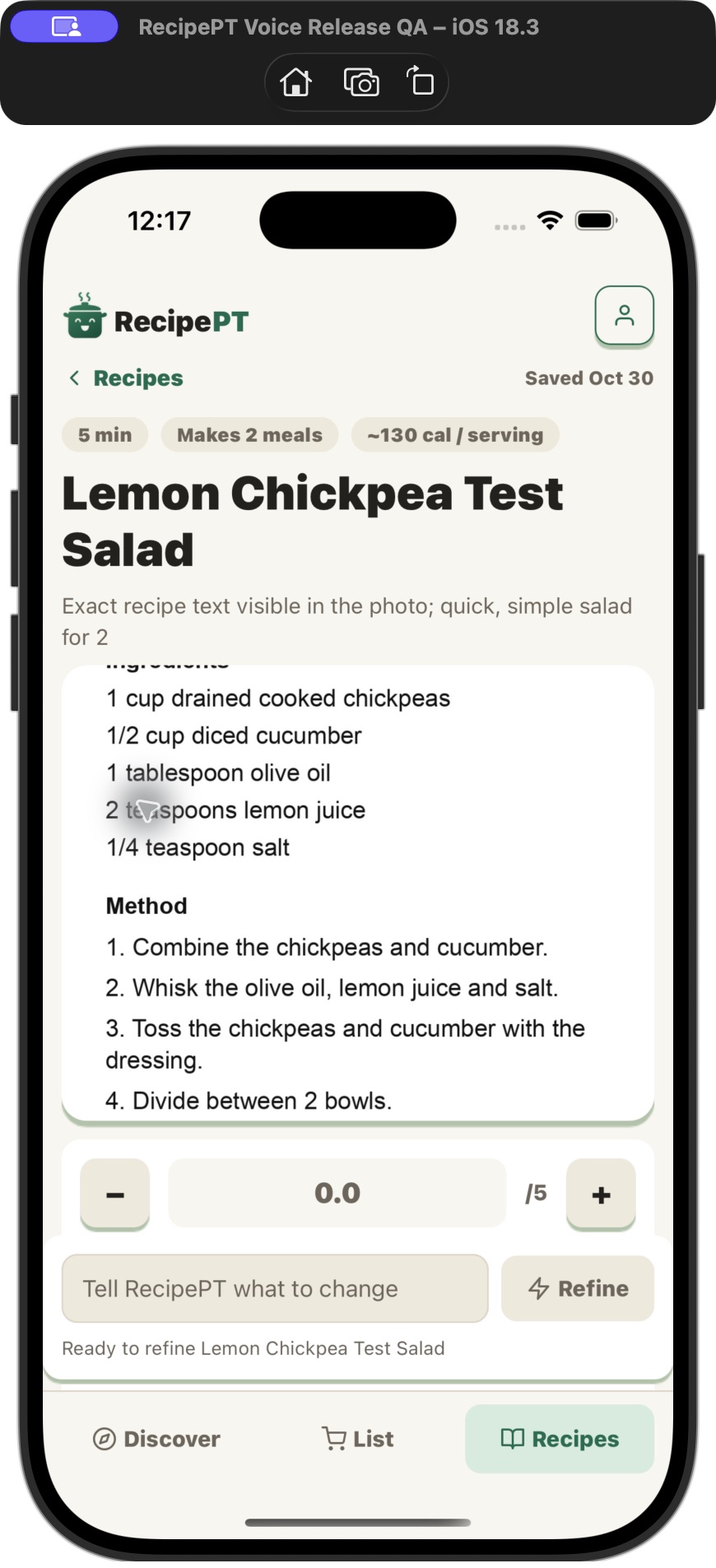
All five quantities were retained. The four source actions were also retained in the checked app text: combine the chickpeas and cucumber, whisk the dressing, toss, and divide between two bowls. We searched the title in Recipes and reopened the saved item.
The app also displayed time and calorie estimates that were not in our source. We did not verify those estimates. This was one clear, single-image test; it does not establish accuracy for handwriting, blurry photos, multiple images or other recipes.
If the recipe spans two or more screenshots
Do not assume importing the first image will recover the rest, or that separate imports will merge. We have not verified a multi-image merge in RecipePT.
Instead, assemble one complete text version first. On a supported iPhone, Apple's Live Text can copy words from images:
- Open the first screenshot in Photos.
- Touch and hold a word, adjust the selection, and tap Copy.
- Paste it into a note. Repeat for the remaining screenshots in recipe order.
- Remove overlapping duplicate lines, then compare the combined text with every image.
Apple lists iPhone XS, iPhone XR or later with iOS 15 or later for Live Text; language and region availability varies. See Apple's Live Text instructions if text selection is unavailable.
Once you have the complete title, ingredients and method, use our written-recipe import walkthrough. It shows the text route and documents additions the app made in a separate beta test. If a number is unreadable, find the original or ask the person who sent the recipe rather than guessing.
Check these details before cooking or building a grocery list
Read the original and the saved version side by side. Check more than whether the ingredient names look familiar.
| Check | What to compare |
|---|---|
| Fractions and units | Did 1/2 stay 1/2 or 0.5? Did teaspoons stay teaspoons rather than tablespoons? |
| Servings | Does the yield still match the original? Were quantities changed? |
| Ingredient details | Did words such as cooked, drained, divided or softened survive? |
| Method | Are all steps present, in order, including temperatures and waiting times? |
| Additions | Are new amounts, substitutions, cooking times or nutrition estimates supported by the original? |
If a detail is missing or different, resolve it against the source before relying on the recipe. A complete-looking card can still contain an unsupported addition. Keep your original screenshots even after the first successful import; they let you check a doubtful quantity later.
Does saving it make it public?
Importing into RecipePT is for your own Recipes collection, not posting to a social feed. That does not mean the information stays only on your phone. Our privacy policy describes account storage and the information used by service providers, including third-party AI services. Remove unrelated personal details before uploading a screenshot.
Try one recipe before moving the whole collection
Pick a complete screenshot you actually want to cook from. Import it, check it and reopen it. If you only need to keep the image, a Photos album may be enough; a recipe app is useful when you want the ingredients and method organized into a saved recipe.
RecipePT is free to download. Check import access, available plans, local prices and any trial terms in the app before continuing.
Find something good for dinner.
Browse recipes, search an ingredient, and pick something that fits tonight.
Browse recipes →