
AI dinner apps
TasteOS, FoodiePrep and RecipePT: What an App Means When It Says It Learns Your Taste

Quick answer: The best TasteOS alternative depends on what should teach the app. Choose TasteOS if you will log meals and score flavor dimensions, FoodiePrep if you want a weekly plan built from a profile and pantry, or RecipePT if tonight's choices should change from food rules, temporary requests, and the dinners you save, rate, reject, and cook.
“Learns your taste” can describe three very different systems. One asks you to grade sweetness and crunch after a meal. One begins with a planning profile and pantry. One watches what happens while you decide dinner. The useful comparison is not which app says “personalized” most often. It is what evidence each app accepts, how much work collecting it takes, and whether you can correct the result.
I build RecipePT, so this is a comparison published by one of the products in it. Competitor claims below come from the current TasteOS feature page, TasteOS App Store listing, and FoodiePrep meal-planner page, checked on September 11, 2026. Where those pages are silent, this post says so.
What is the best TasteOS alternative?
FoodiePrep is the closest alternative when your goal is a personalized week of meals. RecipePT is the closer alternative when your problem is choosing dinner tonight. Neither recreates TasteOS's eight-part flavor fingerprint. Choose by the decision you need made, not by treating every claim to “learn your taste” as the same feature.
- Choose TasteOS for deliberate meal logging and flavor-level feedback.
- Choose FoodiePrep for profile-based weekly plans, pantry use, and grocery lists.
- Choose RecipePT for a small set of tonight-ready ideas that adapts as you choose.
That division matters because personalization has a collection cost. TasteOS asks for unusually rich feedback and can build an unusually explicit flavor picture from it. FoodiePrep gets useful planning constraints quickly. RecipePT learns inside a job you were already doing. The best system is the one whose input you will still provide after the novelty wears off.
What should “learns your taste” mean in a recipe app?
It should mean the app's future choices change because of evidence gathered after setup. A diet, allergy, or stated dislike is a rule you supplied, not something learned. Useful learning has three parts: a repeatable signal, a visible effect on later recommendations, and a way to correct the app when it drew the wrong conclusion.
Setup still matters. An allergy should not wait for an algorithm to notice it, and a vegetarian diet should not be treated as a soft preference. The problem starts when an app combines hard rules, a passing craving, and a weak inference into one hidden bucket called taste. You cannot know which part produced the recommendation, or how to fix it.
This is a narrower test than our earlier roundup of recipe apps that learn your taste. That comparison asks what each product remembers. This one asks where the evidence comes from, how long it should live, and what happens on a night that does not resemble your usual habits.
How does TasteOS build a Taste Fingerprint?
TasteOS starts with a quick taste quiz, then asks you to log meals and rate sweet, sour, salty, spicy, umami, aroma, crunch, and creaminess. Its official pages say those meal records and feedback evolve an eight-dimensional Taste Fingerprint, which the app uses when generating recipes matched to your palate.
The important word is meals, not recipes. TasteOS says you can log restaurant food, takeout, or something cooked at home, optionally add a photo, score the sensations, and say whether you would eat it again. That gives it evidence beyond its own generated recipes. It can learn from the pad thai you ordered as readily as the soup you made.
This is the richest declared taste instrument in the comparison. It is also the most deliberate. A slider for umami captures more nuance than a heart button, but only if you keep moving it. Pick TasteOS when mapping your palate sounds valuable enough to become a small habit, not when every extra log feels like homework.
How does FoodiePrep personalize a week?
FoodiePrep begins with goals, diet, allergies, cooking skill, and ingredients in your pantry. It uses that profile to generate a seven-day plan, recipes, macros, and a categorized grocery list. You can swap a meal you dislike. Its public pages do not specify whether that swap permanently changes a learned taste model.
That is not a criticism of the planner. It is a boundary on what can be verified from the product's own public explanation. FoodiePrep says its assistant learns taste preferences and remembers preferences, while its detailed flow explains onboarding inputs and one-tap swaps. It does not document whether a rejected Tuesday curry changes next month's plans or only replaces Tuesday.
FoodiePrep wins when the artifact you want is a week. Its public flow ends with a complete plan and a store-ready list, not a flavor chart or a short conversation about tonight. If your household needs structure across seven days, that output is more useful than deeper taste learning aimed at one meal.
How does RecipePT learn while you decide dinner?
RecipePT keeps three signal types apart: food rules you declare, requests that apply only to the current dinner, and patterns from saves, ratings, rejections, and meals marked cooked. It uses them to choose a small set of dinner ideas, then lets your typed refinements reshape the current set without making every sentence permanent.
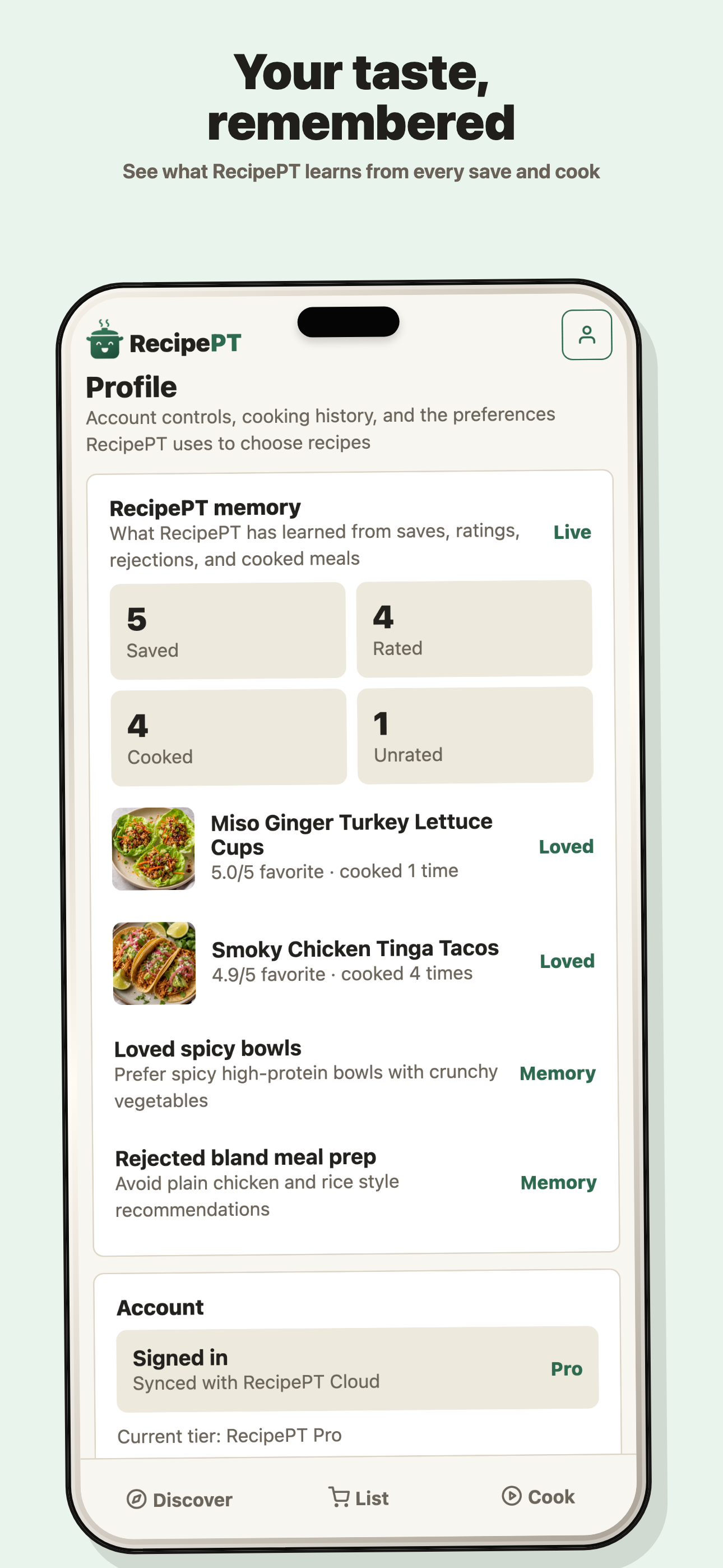
That separation is the product-specific proof. The current Profile screen names the learned sources and exposes counts for Saved, Rated, Cooked, and Unrated. In the screen below, it also shows named history, including Miso Ginger Turkey Lettuce Cups and Smoky Chicken Tinga Tacos, beside learned notes such as “Loved spicy bowls” and “Rejected bland meal prep.”
A request such as “nothing heavy tonight” can guide the current decision without banning rich food next month. “I cannot eat mushrooms” belongs in a lasting food rule. The distinction, explained more fully in which food rules an app should remember, prevents a strange Tuesday from becoming a permanent identity.
Which app handles a night when you do not feel like yourself?
RecipePT has the clearest public separation between tonight and long-term memory: typed session requests can expire while durable rules and learned history remain. TasteOS lets you ask its assistant what you crave, but its public pages do not explain the lifetime of that request. FoodiePrep's visible unit is the weekly plan and meal swap.
This edge case reveals the architecture. If you normally love spicy food but want plain toast after a rough day, the app should honor the moment without deciding your palate changed. TasteOS has the richest long-term flavor vocabulary. RecipePT publishes the clearest lifetime boundary. FoodiePrep lets you repair the schedule by swapping the meal. Those are different answers to the same exception.
Which taste signal is easiest to correct?
TasteOS gives you explicit flavor sliders and a would-eat-again signal, so the input itself is precise. RecipePT shows the history and learned notes that inform dinner ideas, while keeping editable food rules separate. FoodiePrep offers a direct meal swap, but its public documentation does not show a separate, inspectable taste record behind the plan.
Precision and visibility solve different problems. TasteOS helps you say exactly what the meal tasted like. RecipePT helps you see what the app concluded from repeated choices. FoodiePrep helps you remove the wrong meal from an otherwise useful plan. Choose the correction loop you will actually use when the app gets dinner wrong, because every personalization system eventually will.
Which app should you choose?
Choose TasteOS to build a detailed flavor model from meals you are willing to log. Choose FoodiePrep to turn a household profile and pantry into a full week. Choose RecipePT when you want tonight narrowed first, your ordinary choices to teach the next shortlist, and temporary requests kept out of permanent memory.
| Decision | TasteOS | FoodiePrep | RecipePT |
|---|---|---|---|
| Primary job | Generate recipes from a flavor fingerprint | Build a personalized weekly plan | Decide tonight's dinner |
| Starting signal | Taste quiz and dietary preferences | Goals, diet, allergies, skill, pantry | Food rules, household context, prior dinner history |
| Ongoing signal | Logged meals, eight taste ratings, would-eat-again | Meal swaps are public; lasting effect is not explained | Saves, ratings, rejections, cooked meals, typed refinements |
| What you inspect | Eight-dimensional Taste Fingerprint | Profile, pantry, weekly plan | Food rules, history counts, learned taste notes |
| Best fit | You enjoy logging and want flavor detail | You want the whole week organized | You want tonight narrowed with visible memory |
No app wins every row. TasteOS has a flavor vocabulary neither competitor publishes. FoodiePrep produces the broadest planning artifact. RecipePT makes the memory boundary most visible and aims at the smallest decision. That is the honest verdict: pick the product whose evidence matches the decision you want it to make.
Want RecipePT to use what it remembers tonight?
Start with ideas shaped by your food rules and dinner history, then type what tonight needs. RecipePT keeps the temporary request in tonight while your lasting taste picture stays readable. On iPhone. 1-week free trial. Cancel anytime.
Get RecipePT on iPhoneWhat else should you know?
Is TasteOS a recipe app?
Yes. TasteOS is available for iPhone and iPad and also has a web product. Its main distinction is a Taste Fingerprint built from a starting quiz and meals you log. It uses that profile to generate recipes, while also offering pantry input, shopping lists, and saved cookbook collections.
Does TasteOS learn from meals you eat?
TasteOS says it does. You can log restaurant, takeout, or home-cooked meals, rate eight taste and texture dimensions, and mark whether you would eat the meal again. Its official feature page says the Taste Fingerprint evolves as you log meals and give feedback.
How does FoodiePrep personalize meal plans?
FoodiePrep says it starts with your goals, diet, allergies, cooking skill, and pantry, then builds a weekly plan, recipes, and grocery list around that profile. You can swap a meal you dislike. Its public pages do not clearly explain whether a swap becomes a lasting taste signal.
What does RecipePT remember?
RecipePT keeps declared food rules, temporary requests for the current dinner, and a learned taste picture separate. The current Profile screen shows saved, rated, cooked, and unrated counts plus learned notes. That visibility helps you tell a permanent rule from a pattern the app inferred.
Find something good for dinner.
Browse recipes, search an ingredient, and pick something that fits tonight.
Browse recipes →