
AI dinner apps
Paprika and AnyList Are Recipe Organizers, Not Dinner Deciders. When You Need Which.
Quick answer: Pick by the artifact your kitchen runs on. If recipes are the asset and you cook alone, Paprika, a $4.99 one-time iOS purchase. If a shared grocery list is what the household runs on and two people shop, AnyList, free to download with the meal planner behind a subscription. Neither one decides dinner.
These two get compared as if they were the same app with different logos. They are not. Paprika is built outward from the recipe and produces a grocery list at the end. AnyList is built outward from the list and added a recipe box on top. Which one is better depends entirely on which of those two things is the center of your kitchen, and on one question most comparisons skip: does anyone else in your house need to see it?
Paprika or AnyList: which should you actually pick?
If your recipes are the thing you care about and you cook alone, Paprika. If the grocery list is the thing your household runs on and two people shop, AnyList. Paprika is a $4.99 one-time iOS purchase. AnyList is a free download with the meal planner and web recipe import behind a subscription.
Every app fact in this post was pulled from the live App Store listings on August 12, 2026. Prices and rating counts move. The shape of each app moves far more slowly, and the shape is what you are actually choosing between.
What is the real difference between Paprika and AnyList?
Direction of build. Paprika Recipe Manager 3 starts with a recipe you saved, then generates a combined, aisle-sorted list from it. AnyList starts with a shared list your household edits live, then lets you attach recipes to it. Both end up with recipes and a list. They arrive from opposite ends.
That difference shows up in what each one is unusually good at. Paprika's listing describes recipe download from websites, a pantry that tracks what you have and when it expires, daily, weekly and monthly meal calendars, saved reusable menus, ingredient scaling and unit conversion, a cook view that keeps the screen on and highlights your current step, timers detected automatically from the directions text, and fully local storage so nothing needs a connection. It carries a 4.9 average across 53,433 ratings, and version 3.8.5 was updated on July 16, 2026. That is a serious, mature tool for someone whose recipe library is the asset.
AnyList comes at it from the store aisle. Free download, 4.9 average across 79,779 ratings, version 7.0.3 updated August 4, 2026. Its strengths are list strengths: instant sharing with a partner or roommates with items checking off in real time, smart autocomplete while typing, automatic sorting into categories you can re-order to match your own store's layout, notes and photos on individual items so the right brand comes home, Siri and widget entry. Its own listing opens by naming the question, and calls itself the app for busy families.
The pricing shapes are opposite too, in a way that matters more than the numbers. Paprika is paid once and then done, but its listing states plainly that each platform version is sold separately, so a Mac or Windows copy is another purchase. AnyList costs nothing to start and stays useful unpaid if all you want is a shared list, but the current listing puts web recipe import, the meal planning calendar, and Mac, PC and Apple Watch access inside AnyList Complete, its subscription tier. Cheap forever versus free-until-you-need-the-good-part.
Which one is better for a household?
AnyList, clearly, and it is not close. Its list is shared between people in real time, so one person adds milk while the other is standing in the dairy aisle. Paprika syncs your recipes, lists and plans across your own devices. That solves phone-to-iPad, not partner-to-partner, and those are different problems.
This is the single most useful question to ask yourself, and most head-to-head posts bury it under feature tables. If two adults shop, the app has to be a shared surface or it will lose to a text message. AnyList was designed as that surface. Paprika's sharing is recipe sharing, over AirDrop or email, which is a nice thing to have and a completely different mechanism from a list two people are editing at once.
The flip side is real. If you are the only person who cooks and shops, AnyList's central advantage is worth nothing to you, and you are choosing on recipe features, where Paprika is deeper.
Which one is better if you collect recipes?
Paprika, and by a wide margin. Categories and subcategories, search by name or ingredient, scaling and unit conversion, a pantry with expiration tracking, printing including index card formats, export to Calendar and Reminders, and imports from older desktop apps like MacGourmet and MasterCook. It is a librarian's app.
The offline point deserves its own sentence. Paprika stores everything locally and does not need a connection to read your recipes, which is the sort of thing you never think about until you are in a rental kitchen with bad signal. And the automatic timer detection inside directions is one of those small features that quietly proves the app was built by people who cook.
We said the same thing in the best recipe app for iPhone breakdown: if what you own is a decade of saved recipes, buy Paprika and stop shopping. We will happily route you there. The trouble starts after you do it.
So why do you still not know what to make tonight?
Because both apps are storage. Paprika holds recipes you already chose. AnyList holds items you already decided to buy. Neither one looks at what you like, what you cooked recently, or what is in the fridge and returns an answer. They are excellent at remembering decisions and silent about making them.
Here is the tell, and it is in AnyList's own marketing. The listing opens by describing the reader as someone always asking what is for dinner, and what it then offers is a very good place to write the answer down once you have one. That is not a criticism of AnyList. It is the honest boundary of the category. An organizer cannot decide, because nothing in it knows you.
The familiar version of this is the weekend import. You spend a Saturday pulling in every recipe you have ever saved, tag it all, feel genuinely accomplished, and then at 6:10 on Tuesday you scroll your own beautifully organized library and still put in an order. A bigger library makes that scroll longer, not shorter. We pulled that loop apart in dinner decision fatigue, and the short version is that the bottleneck was never storage.
How does RecipePT sit next to them?
It takes the part neither one does. RecipePT looks at what you have rated, cooked and ruled out, and returns dinner ideas built for your household tonight. You steer them by typing, not by filtering. It is a decider that also builds a list, rather than a library that also stores one.
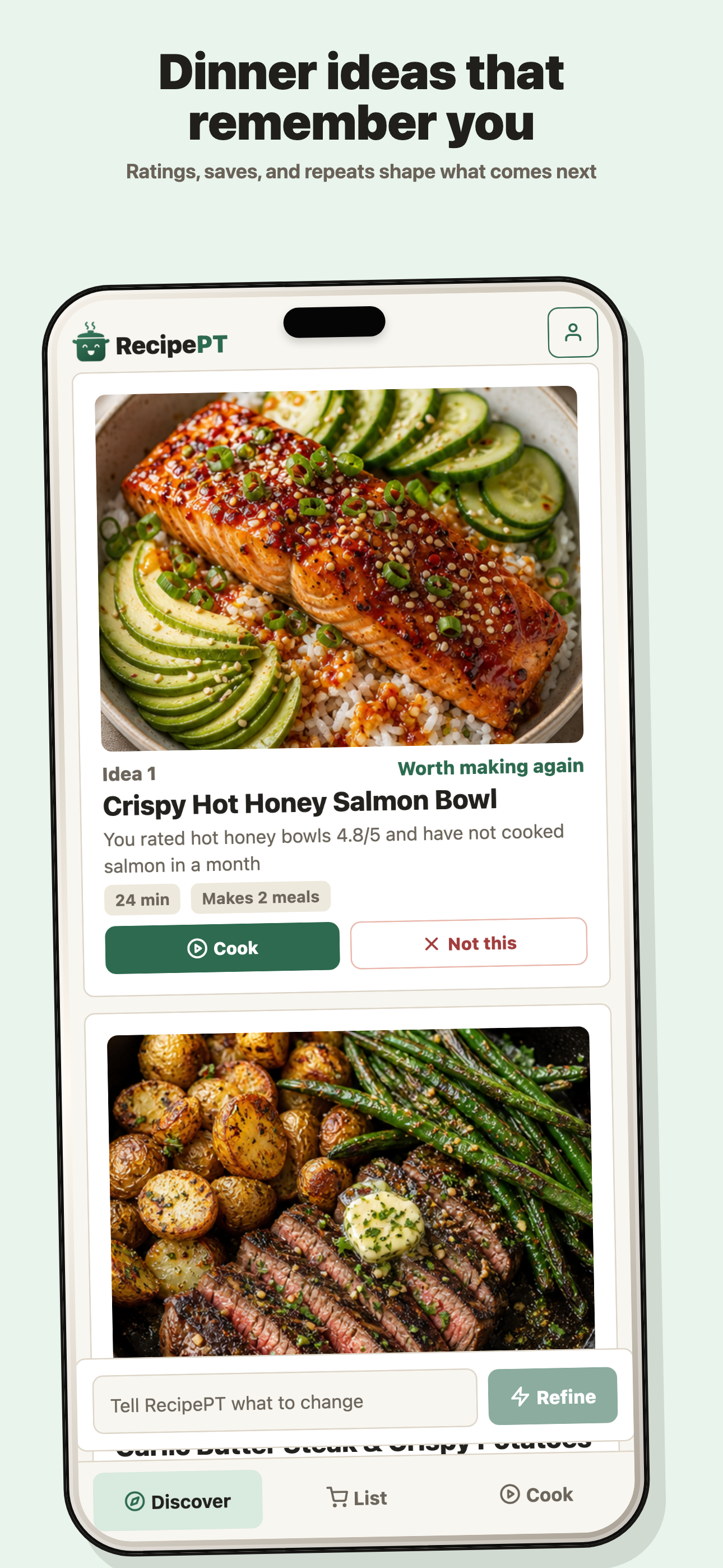
What that actually looks like in use, concretely:
- You correct it in sentences. Type "lighter", or "we had pasta twice this week", or "nothing that needs the oven", and the ideas re-form around it. There is no settings screen holding those, because they are not settings, they are tonight.
- The no stays said. Say "no onions" once and it holds past tonight, so tomorrow does not ask you again. That mechanism is the whole subject of the picky eaters post.
- It tells you when you last made something. Seeing that you cooked a dish twelve days ago is usually the exact fact that settles whether to repeat it, and it is a fact neither an organizer nor a chatbot has.
- The list comes after the decision. Commit to a dinner and its ingredients land in a grocery list sorted by aisle. The list only ever contains food attached to something you actually chose.
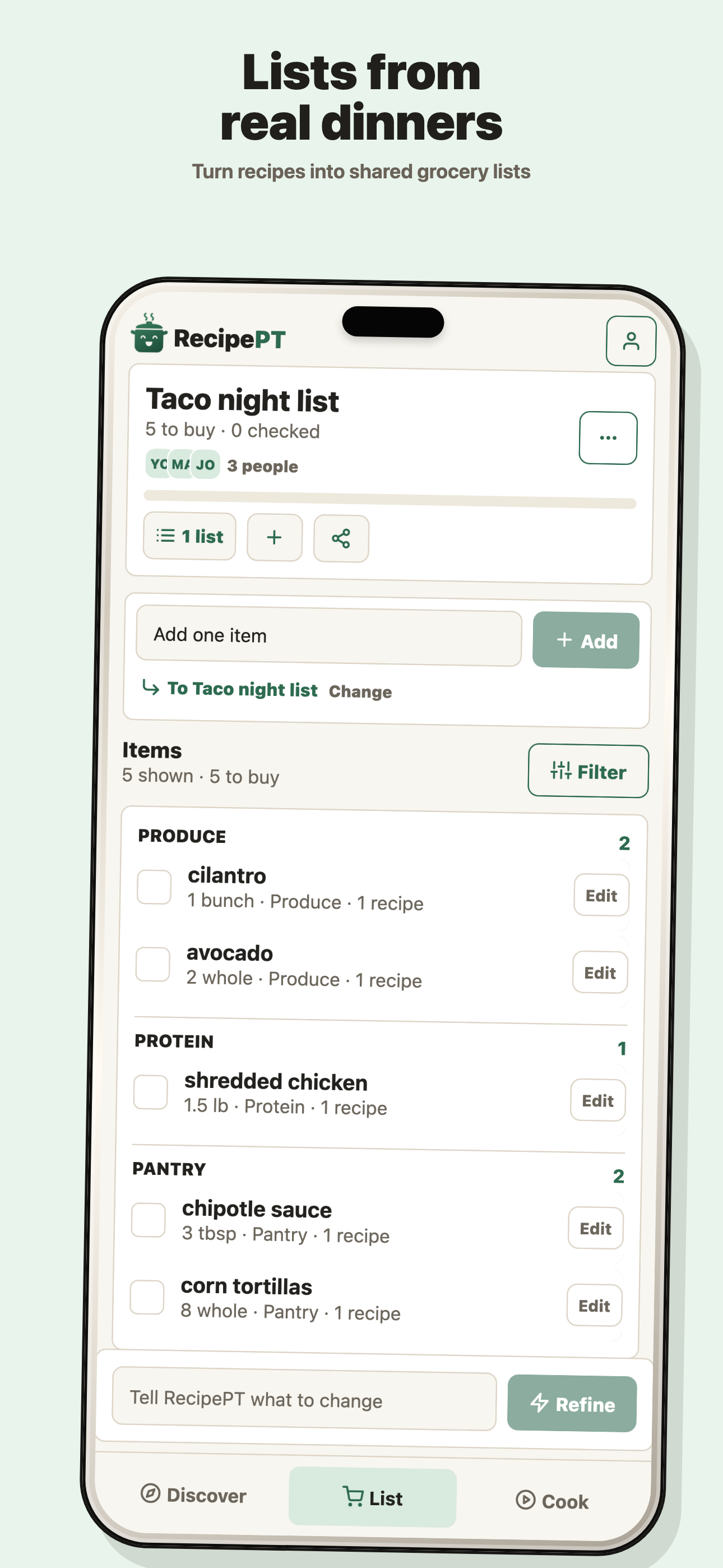
The honest limits, since this is a comparison post. RecipePT is iPhone only. It is a paid subscription, where Paprika is $4.99 once and AnyList's list is free. It is not trying to be the archive for 900 recipes you have collected since 2014, and it does not share a live list with your partner the way AnyList does. If your problem is organization or coordination, the two apps in this post's title are better than we are at it, and you should buy one of them.
What should you do tonight?
Pick by the artifact your kitchen runs on. Recipes, alone: Paprika, one purchase, done. Shared list, two shoppers: AnyList. But if the shelf is already full and the problem is choosing, adding a better filing cabinet will not fix it, and that is a different kind of app.
Most people searching this comparison are not really stuck between two organizers. They are hoping one of them will finally make the evening easier, and organization is the closest thing they know how to buy. If that is you, it is worth being honest about which job you are hiring for before you pay for either. The related version of this argument, aimed at people whose fridge is already stocked, is in cook with what you have.
Let RecipePT decide tonight
RecipePT learns what your household actually eats, holds the things you have ruled out, and hands you dinner ideas made for tonight instead of a folder to search. 1-week free trial. Cancel anytime.
Get RecipePT on iPhoneCommon questions
Is Paprika a one-time purchase?
On iOS, yes. Paprika Recipe Manager 3 is a $4.99 paid download as of August 12, 2026, with no in-app purchases listed. The catch is platform coverage: the listing states that each platform version is sold separately, so the Mac and Windows versions are their own purchases.
Do you need an AnyList subscription to import recipes from a website?
Yes. AnyList is a free download and the shared grocery list works without paying, but the current App Store listing puts importing recipes from the web, the meal planning calendar, and access on Mac, PC and Apple Watch inside the AnyList Complete subscription.
Can you use Paprika and AnyList together?
People do, and it usually collapses. Both apps want to own the grocery list, so you end up maintaining two of them. If you run both, pick one to hold recipes and one to hold the list, and never let the second one store a recipe.
Which is better for a couple who shop separately?
AnyList. Its list is shared with other people in real time, so items get checked off while someone is in the store. Paprika syncs your data between your own devices, which is a different problem and does not help the person already at the shop.